Showing posts with label freebie downloads. Show all posts

Saturday, September 20, 2014

Saturday Challenge from My Memories "Orange"

Good Day;)
I am excited to bring you my challenge kits for My Memories Saturday.
Here are your links:


Orange paper mash up

Today only $2.00 per kit. 


Here is my sample layout page.
We took a nice walk with Maddie up to the Monroe Park:


Thanks for Stopping by Today;)

Friday, September 19, 2014

Pixel Scrapper Challenge RED

There is a challenge up at 
The Challenge is "RED"
Before I hand out my freebie I want to talk a bit about 
If you go and sign up you will get one free download
per day.
If you sign up for unlimited Commercial you can
download anything you wish any day of the week.
Surf on over and check out all the goodies.

Thanks for Stopping by today;)

Friday, August 1, 2014

Pixel Scrapper August Blog Train "Garden Party"

Here is a fun blog train from 
"Garden Party"
 Here is my portion:
FREE download HERE 

Please visit Pixel Scrapper and pick up all of the other designers
FREE goodie downloads on the Garden Party Train.
While you are there sign yourself up you can do that for free.
For me Commercial use is the way to go.

Chug on over to
Pixel Scrapper/forums/blog train
and pick up your FREEBIES today.

Thanks for stopping by;)

Thursday, August 15, 2013

My Memories Import Outside files and Version 4 Digital Software GIVEAWAY

I am back today with my version of the My Memories Designer Bag freebie this week.
Below I will show you how you can import your own digital files into the software.
It is super simple and makes the possibilities for your creations endless.

There is also a GIVEAWAY.  You don't want to miss this one.

My designer bag...
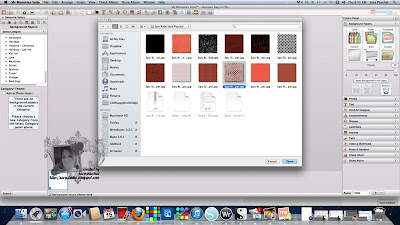
Steps to import files into your My Memories project.


1.  Open your downloaded template file.  This one is called Designer Bag.

2.  Click background papers/custom/ (open the folder that contains the paper you wish to use).
For this project I used my Epic Ride kit and my favorite paper Gingham Distressed.

It is that easy and you can use any image file on your computer from jpg to png's.

Click on photos to enlarge.

Below you can see the imported digital paper under the template.

Here is a video from My Memories...

 
  1.  Leave a comment on this blog post before midnight CST September 1st 2013.
2.  Include in your comment Your favorite
My Memories Store
 
I will choose one comment to receive
Version 4
digital software download.


Want to
get started with
today? 
For less than $30 and get $10 worth of free products,
this is a great steal!
CLICK HERE to read about the software.
Remember to use my coupon 
STMMM97 
to receive $10.00 off your software purchase.


Youtube Videos

So what are you waiting for?  Go create your Memory today!
 
Thanks for stopping by today:)

Wednesday, August 14, 2013

My Memories Freebie Designer Gift Bags

These three freebie downloads from 
are available until 
August 25, 2013 
so go grab them today.


Get started with
for less than $30 and get $10 worth of free products,
this is a great steal!
CLICK HERE to read about the software.
Remember to use my coupon 
STMMM97 
to receive $10.00 off your software purchase.


Youtube Videos

So what are you waiting for?  Go create your Memory today!

Wednesday, December 12, 2012

Oh CHRISTmas Tree

3 new 3D Craftable Freebies from
*Download links are found under the sample photos, download free thru December 24th 2012.


 You can find the assembly directions online HERE.
Thanks for stopping by today;)

Tuesday, November 27, 2012

My Memories Version 4

There was a big announcement over the holiday weekend about a newer version of
It has been released and is available now in the store
Remember to enter my code for an additional $10.00 in savings!
STMMM97
What awesome stocking suffers and gifts this software makes for the Christmas Holiday!


It is FREEBIE time once again over at 
you have access
to THREE 3D star downloads.
(Links are posted under each preview.)

Here is a sample of Winter Magic 3D star from Story Rock assembled...


**You do not need to software to download these freebies they will work on most graphic software just print, cut, and assemble.

You can find more information on My Memories at these links:


Youtube Videos

So what are you waiting for?  Go create your Memory today!

Wednesday, November 14, 2012

TakeOut Craftables with My Memories

The new Craftable selection offered on 
is so much fun.
Even more fun are the freebies they have been sharing.
Today there are
3
yes
3
free download links for you!
Here is a project I have in the works using

Alas, I am out of ink and not making a run for more. So I have
to wait to show you the finished version using this kit as shown above.

Below is the kit preview for Wonderful Winter:

Here is the constructed takeout box from Fading Frost:

here come your freebies...
Fading Frost TakeOut
Heart and Home Take Out


These freebies are compatible with any graphics editing program AND with My Memories Suite, the easiest digital scrapbooking software available. 
 Get started for less than $30 and get $10 worth of free products,
 it’s an awesome deal!
CLICK HERE to read about the software.
Remember to use my coupon 
STMMM97 
to receive $10.00 off your software purchase.

 Click HERE to see the assembly instructions.

Saturday, October 27, 2012

Digital Stamps Tutorial

Today, I am going to show you how I use my Digi Stamps with an easy
Photoshop Tut.
The sentiment digi is from
QKR Stampede
10907Ancient

This is the card I showed you yesterday.  
The post for it can be found here.

I have taken the leap into digi and I am not looking back.
I totally enjoy creating with my computer and using digital image files.
Not only do digi stamps take up less room you indeed have more
creative freedom of use.
Size
&
Color
 are my go to examples.

Below is the digi as you see it in the
QKR Stampede Store
it is a JPG image file.
This means the background is not transparent.
With digital stamps more often than not the background
will be white.

1.  Download your digital image
2.  Open digital stamp in Photoshop
3.  Use the file menu to duplicate your file
(this way you are not making any changes to your original digi stamp)
4.  Close your original file
5.  Select your magic eraser tool and 
begin clicking in on the background
 to remove.
(in the photo below I left some white in Ancient so you can see the process)
I do this because I love to add drop shadows and outlines and the finished project
is more awesome with transparency.

6.  Apply your colors and effects
Then I added a complex  Color Target function.
In order to do these functions you MUST remove the entire background from the jpg.

When you don't remove the entire background you end up with something like this:
NOT PRETTY!

Here is the digital stamp colored and saved as a png file 
to maintain the transparency done the proper way:
Print it off in the size you need and you are good to go.
That is an easy way using the content short cuts 
(and there are MANY to choose from).

So my suggestion is to always remove the JPG white background
and when you save your file after you are completed save 
as a PNG.

So are you ready to give this digi sentiment stamp a try?
Meribeth from QKR Stampede has agreed to let me give this digi sentiment ancient to my blog readers.
AWESOMESAUCE!  Thank you, Maribeth;)
Please, leave a comment below with your EMAIL address so we can send you your free image.

You can also download the background I created for my card, just click on image and save the file.


Wednesday, October 24, 2012

Party On


Our oldest is turning 18 at the end of the month 
I just had to make up a few of these party hats.
You can also!  The downloads are free and can be used with
or other compatible graphic programs.
Just print, cut and assemble.


I used the Teen Dream Free Download Below.
Swapped out the paper, and element and the words to make the
project work for my need.
Simple and easy to make this craftable  template your own.
(Not to mention the templates are cute just as they are.)
So many possibilities.

Before I get to the download details I have happy dance news.
Are you ready?
I am giving away 
My Memories software to one lucky blog reader.
That is right comment on this post after visiting
tell me what your favorite
designer kit is.
That is it, your comment will enter you in the drawing.
Share this post on Facebook for another chance, come back and let me know that you shared.
Tweet this post for another chance, come back and comment that you tweeted.
Pin this post for another chance, come back and comment that you pinned to win.
You have til October 31st to share and comment
 a winner will be chosen at random shortly after that.

Now, moving on to the craftable freebies:
Is offering up these 3 free craftable downloads,
grab your's today they are only available for a limited time.

 Download free Chocolate Kisses party hats
 Download Outer Space party hats


Sunday, October 21, 2012

A Coffin Full of Freebies

Today's treat is brought to you by
Here is my coffin box created with the freebie download
found below:

Of course not you need Mtn Dew as well, DUH!
;)

My packed coffin gift box,
coffee, candy and nerdy toys this is to die for!
These would be awesome for your coworkers and employees.

Yes, I used the first download below and switched out the background
paper for this plaid I have been playing with this season.
Below is a screen shot of that process:


These three downloads are offered to you for FREE from
for a limited time only so go grab your designer packs today!

You can find a great tutorial here for these particular downloads.

HOWEVER, My Memories Designer Packs are compatible
with other graphic programs.
Just print, cut and glue.
Yes, you can do that;)

Now here are some freebies made by me to complete my project:
Enjoy!